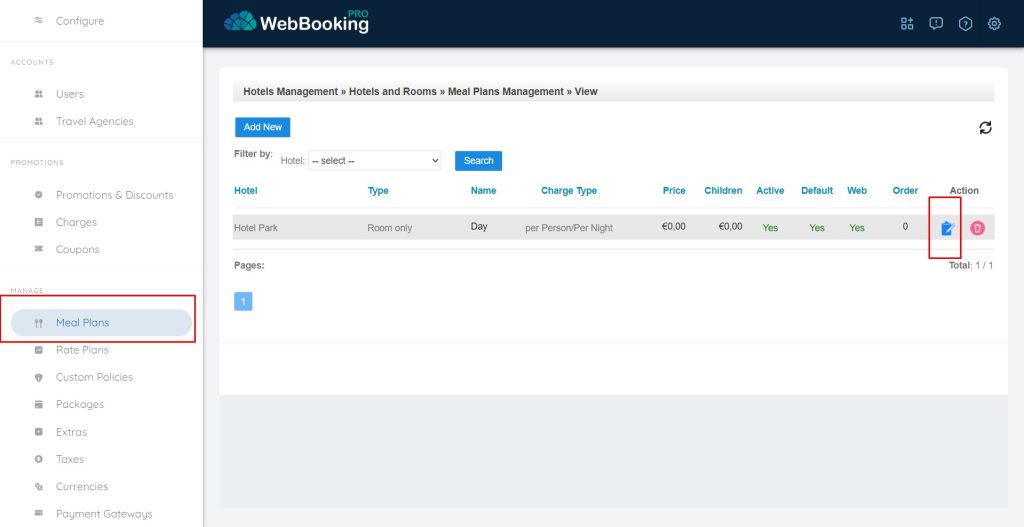
Next we suggest configuring available and (Default) Meal plan.
Even if you do not have Meal plans available in your property (e.g. you just sell overnight stay) – you have to configure Text and Description of Default Meal plan to be “Overnight” or “Day”.
Through Meal plans menu you can define possible meal plans, addition per person or per unit for each possible meal plan.
Also Meals plans can be visible on direct Booking Engine on your website and not (checkbox “Available on Web”).
If your property has all meal plans visible on web (checkbox “Available on Web” is checked) available at the same time when Room is available (Availability is 1 or higher and there is defined price for Standard Rate), then Meal plans is right place for you.
If your property has for example Halfboard not always available, or different pricing policy or different payment/cancellation policy then we suggest creating Meal plans as additional rates through Rate Plans.
With hotels we always suggest using aditional Rate Plans for additional Meal plans. For vacant rentals if they offer Room-only and Breakfast as possible charge, and Breakfast is always available when Room-only is available, then Meal plans is enough.
Choose Meal Plans from left menu.
You can Edit default Meal plan (or any other if available) by clicking on blue “Edit” icon at the end of every line under Action column.